A softphone turns a computer or smartphone into a business phone.
It uses VoIP to make and receive calls over the Internet.
It allows users to keep their business number whether they are in the office or working remotely.
It is particularly well suited to mobile teams and hybrid working environments.
It reduces the amount of equipment required and simplifies user management.
A softphone is an application that turns a computer, smartphone or tablet into a business phone. Using VoIP, employees can make and receive calls and use their business number without relying on a physical desk phone.
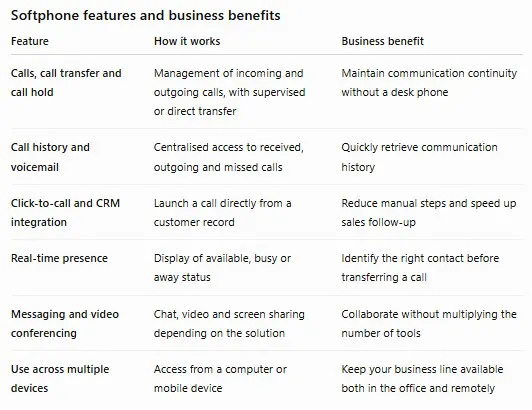
A softphone also brings together features such as call transfer, call hold, instant messaging and video conferencing. It therefore becomes a central tool for businesses looking to simplify their telephony and support hybrid working.
What is softphone for businesses?
A softphone is an application installed on an existing device, such as a PC, Mac, smartphone or tablet. Its interface replicates the main functions of a business phone, including a dial pad, call history, voicemail, call transfer and availability status management.
Unlike a traditional desk phone, it does not require dedicated hardware. Users simply connect to the company’s cloud phone system using their device and, ideally, a headset suited to their working environment.
For a concise definition, you can also consult Sewan’s Lexicon page dedicated to softphone.
How does a softphone differ from a physical phone?
A softphone reduces the amount of equipment required because it uses a device that is already available. Once the application has been installed and the user account configured, employees can access their business line and phone features.
This flexibility makes it easier to equip mobile teams, remote workers and organisations operating across multiple sites. It also allows new users to be added without necessarily having to install a physical desk phone.
How does a softphone work with VoIP ?
A softphone uses VoIP, or Voice over Internet Protocol, to transmit calls over an Internet connection. During a conversation, voice is converted into data, transmitted in packets and then reconstructed on the recipient’s device.
This makes it possible to use business telephony from different locations and devices. However, call quality depends on the Internet connection, network configuration and audio equipment being used.
To learn more about this technology, see the definition of VoIP telephony.
Can a softphone coexist with legacy systems?
When a business temporarily retains analogue lines or equipment, a VoIP gateway can provide connectivity between the existing infrastructure and the new IP-based system. This approach avoids having to replace the entire phone system immediately.
What is the role of the SIP protocol?
The SIP protocol, or Session Initiation Protocol, manages the signalling required for communications over an IP network. It is used to identify users, establish calls, manage sessions and terminate communications.
With SIP, a softphone can register with the company’s phone system, receive calls and connect with internal or external contacts.
To better understand its role, see the definition of SIP connectivity.
What equipment do you need to use a softphone?
A softphone does not require a dedicated desk phone. To use it effectively, three elements are generally sufficient:
A stable Internet connection, either fixed or mobile
A compatible computer, smartphone or tablet
A microphone and headphones, ideally integrated into a professional headset
A headset improves listening comfort and reduces background noise, particularly in open-plan offices or during frequent calls. For occasional conversations, the device’s built-in microphone and speakers may be sufficient.
What feature does a business softphone offer?
A business softphone is not just for making calls. It brings together telephony, collaboration and availability management features in a single interface.
Not all solutions offer the same features. Before choosing a softphone, make sure to check the available integrations, compatibility with your business tools and the features that are genuinely useful to your teams.
Why use a softphone for hybrid working?
With a softphone, employees can use their business number from home, a coworking space or while travelling. For the person they are calling, the call remains associated with the company’s business identity.
This continuity is particularly useful for sales teams, support teams and customer service departments. It allows employees to remain reachable without having to share their personal phone number.
The application can be installed on a computer, smartphone or tablet. Depending on the solution, users can access their contacts, call history and settings across multiple devices.
A softphone therefore supports changes in the workplace without requiring employees to carry a desk phone with them. It is particularly well suited to organisations that use remote working, flexible office spaces or hot desking.
What are the benefits of a softphone for business?
Reduce the amount of equipment required
A softphone uses the computers and mobile devices already provided to employees. This allows businesses to reduce the need for desk phones, associated cabling and some hardware maintenance costs.
For organisations opening a new site or equipping remote workers, adding a user can often be done remotely. This simplifies deployment and reduces setup times, provided the telephony infrastructure and network are already operational.
Add or remove users more easily
With a cloud-based phone system, administrators can create, modify or remove lines from a centralised interface. Businesses can therefore adapt their phone system to recruitment, seasonal demand or organisational changes.
This flexibility avoids keeping unused equipment and makes it easier to onboard new employees quickly.
Improve mobility without exposing personal phone numbers
A softphone allows mobile employees to make business calls from their smartphone while displaying the company’s business number. This makes it easier to keep personal and professional communications separate.
For sales teams, this mobility can be combined with CRM integration and click-to-call functionality to simplify prospect management.
Bring telephony and collaboration together
Some solutions combine calling with instant messaging, video conferencing, screen sharing and presence indicators. Users can therefore switch between communication channels without constantly changing applications.
This integration can simplify internal communication, but it should address a genuine business need. A company that only needs to make and receive calls does not necessarily require advanced collaboration features.
Simplify your teams' business telephony Equip your employees with a solution they can use in the office, while working remotely or on the go.
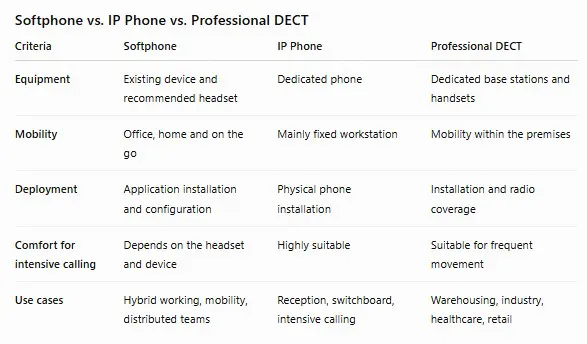
Softphone, IP Phone or DECT: which solution should you choose?
A softphone is not designed to replace every type of business phone. The right choice depends on the user’s work environment, expected mobility and call frequency.
Several types of devices can also coexist within the same organisation. A mobile employee may use a softphone, while a receptionist uses an IP phone and an employee working in a warehouse relies on a DECT handset.
For mobile and hybrid teams, a softphone generally offers the greatest flexibility. An IP phone remains well suited to fixed workstations that handle a high volume of calls. DECT is a better option for employees who need to move around continuously within a site.
What softphone solutions does Sewan offer?
Sewan offers several solutions to adapt softphone services to different business needs. Doko meets everyday telephony and mobility requirements, providing access to calls and key features from a computer or mobile device.
Webex combines telephony with collaboration features such as video conferencing, instant messaging and screen sharing. This solution is well suited to organisations looking to bring multiple communication channels together in a single environment.
IT teams and CIO departments can manage these services through the Sewan ecosystem. They benefit from centralised management to provision users and adjust permissions according to the company’s needs.
This approach makes it possible to combine different use cases: softphones for mobile teams, IP phones for fixed workstations and DECT devices for employees who need to move around a site.
A softphone is an application that turns a computer, smartphone, or tablet into a business phone. It allows users to make and receive calls using VoIP, without necessarily needing a physical desk phone.
A softphone converts voice into data and transmits it over an IP network. It generally uses the SIP protocol to establish, manage, and terminate calls.
Yes. The number remains associated with the business line rather than with a physical device. Employees can therefore use their business number on their softphone when working in the office, at home, or on the move.
Yes. Many solutions are compatible with smartphones, computers, and tablets. Exact availability depends on the application, operating system, and phone service selected.
A softphone is particularly well suited to remote working because it allows employees to use their business line from any device connected to the Internet. However, call quality depends on the connection, network, and audio equipment.
A softphone is an application used on an existing device. An IP phone is a dedicated physical device for making calls. The former prioritizes mobility, while the latter often provides greater comfort for fixed, intensive use.
A professional solution can protect signaling and audio streams using encryption protocols such as TLS and SRTP. Security also depends on network configuration, access permissions, and the company’s security practices.
A headset with a noise-canceling microphone is recommended for regular calls or shared work environments. Make sure it is compatible with both the device and the application being used.
Take your business phone system to the next level Découvrez une solution qui combine mobilité, collaboration et gestion simplifiée pour accompagner tous les modes de travail.