Telephony-CRM integration connects calls to customer data to streamline interactions.
Teams save time thanks to automatic screen pop-ups and click-to-call.
Calls, notes and interactions are automatically logged in the CRM.
This integration improves productivity, the quality of customer follow-up and the reliability of reporting.
Cloud solutions make deployment and integration with the market's leading CRMs easier.
Telephony-CRM integration connects a company's phone system to your CRM in order to centralise interactions and customer data. Thanks to computer telephony integration (CTI), information is automatically surfaced in the tools used daily by sales, support or customer relations teams.
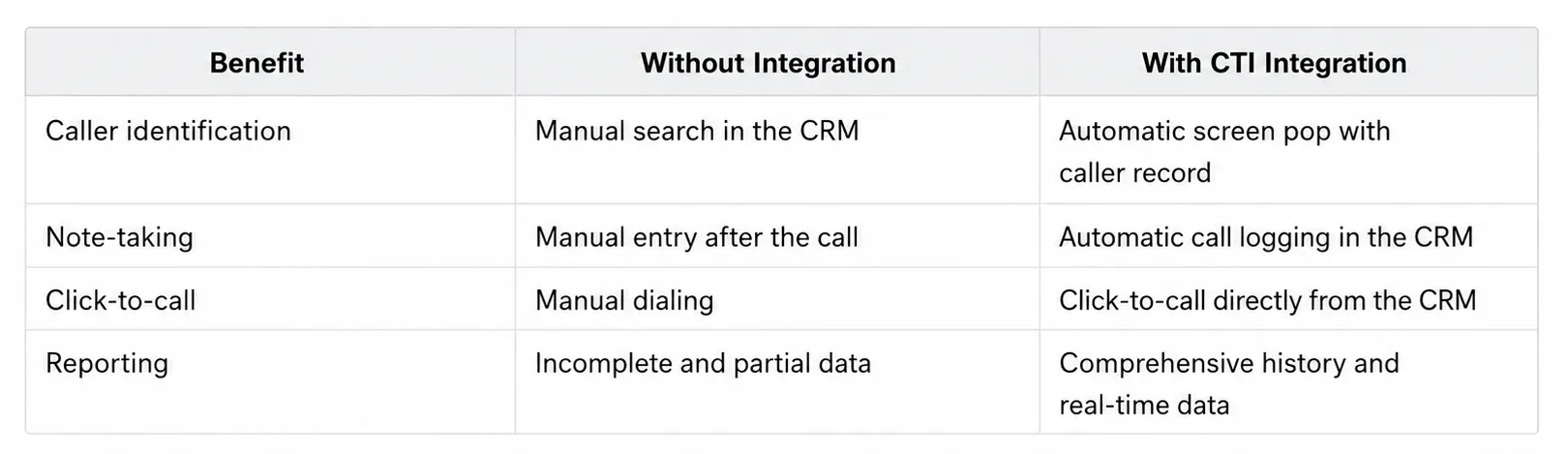
With each call, the customer record appears instantly, the history is updated and interactions are logged without re-entering data.
The result: a better customer experience, more efficient teams and a complete view of telephone activity.
What is telephony-CRM integration?
Telephony-CRM integration refers to the technical connection between a company's phone system and its customer relationship management software. It relies on computer telephony integration (CTI): a mechanism that allows the computer to respond to each telephone event according to rules defined by the administrator, whether displaying a contact record, triggering an action or logging the interaction.
In practice, when a customer calls, their record opens automatically on screen even before the call is answered. Conversely, an employee can launch a call directly from their CRM with a single click. Each interaction is then automatically logged in the customer history.
This telephony-CRM integration works with all modern business telephony modes. It is particularly seamless with hosted telephony, whose cloud architecture natively facilitates software connections. On-premise systems can also be integrated, with additional technical constraints depending on the equipment in place.
Concrete benefits for teams
According to Nucleus Research, the average ROI of a CRM is $3.10 for every dollar invested (study based on 63 real cases, published in August 2023). This figure increases significantly once the CRM is connected to telephony: customer data becomes available in real time, with no friction between the tools.
The first gain is immediate for sales teams. Automatic screen pop-ups eliminate the time spent searching for a contact before answering. Click-to-call eliminates dialling errors and the back-and-forth between screens.
On the customer relations side, the caller no longer has to re-identify themselves with each call, because the agent already has the context: order history, open tickets, latest interactions. A support service that answers already knowing the case reduces handling time and improves perceived satisfaction.
Traceability completes the picture. Each call is automatically logged in the CRM, which feeds reliable reporting on telephone activity without relying on often-incomplete manual entry. For multi-site companies or remote teams, this centralisation guarantees a shared view of interactions, regardless of where employees are working.
Key features of telephony-CRM integration
Screen pop-ups and click-to-call
Automatic screen pop-ups are triggered as soon as the phone rings: the CRM identifies the incoming number and displays the customer file on screen before the call is picked up. Click-to-call works in the other direction: a click on a number in the CRM triggers the call directly via the phone system. For a sales team making dozens of calls per day, these two features represent a measurable daily time saving.
For teams making several dozen calls per day, these features represent a significant time saving and reduce data entry errors.
Call recording, transcription and AI analysis
Call recording coupled with the CRM automatically associates each recording with the relevant customer record. Modern solutions add a layer of AI analysis: automatic summary, sentiment detection, extraction of key information. This data is available in real time in the management platform, without systematic re-listening.
Automatic logging and reporting
At the end of each call, the data is recorded in the CRM record without manual intervention. This logging feeds reliable dashboards and makes it possible to adjust call routing according to actual activity. For high-volume organisations, integration with a contact center and an IVR makes it possible to qualify incoming calls and route them with the available CRM information from the moment they are handled.
Assess your infrastructure and choose the integration mode
1. Assess the existing setup
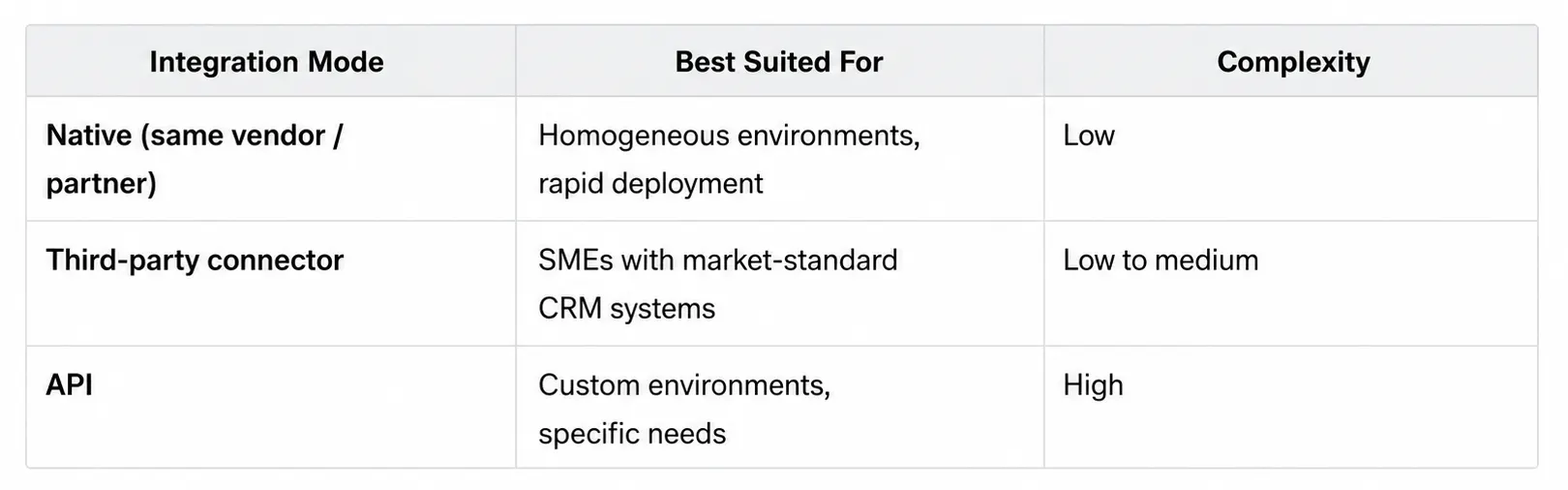
The first step is an audit of the existing setup: which phone system is in place and which CRM? Three integration modes coexist depending on the answer.
2. Choose the integration mode
Hosted Telephony natively integrates a CTI compatible with more than 50 CRMs, which often makes it the fastest solution to deploy for SMEs that use standard tools.
3. Deploy and configure the connectors
Configuration focuses on call management rules: which CRM fields appear on screen, which actions are triggered automatically, which profiles have access to which features.
4. Train the teams
User adoption is a key success factor for the project. Getting to grips with the basic features is quick; the training effort focuses on advanced uses, namely the analysis of recordings, the use of reporting and the configuration of call scenarios.
5. Measure the results
The first indicators to track include the caller identification rate, the reduction in average handling time and the automatic logging rate compared with manual entry. In the medium term, this coupling should translate into an improvement in the conversion rate of incoming calls and better continuity in customer follow-up.
GDPR and compliance: what to anticipate
Connecting your telephony to your CRM involves collecting personal data with each call. This data is subject to the GDPR, which imposes several obligations: prior information to the caller via automated message, explicit consent in certain regulated sectors, defined retention period and secure hosting.
100% French or European hosting is particularly important for companies handling sensitive data (health, finance, HR): it guarantees that recordings and associated CRM data remain under European jurisdiction.
Key takeaways: GDPR compliance
Prior information to the caller is mandatory (automated message at the start of the call).
Retention period for recordings to be defined and documented.
Personal data from calls subject to the same rules as other CRM data.
French or European hosting recommended for sensitive sectors
Simplifying telephony-CRM integration with Sewan
Integration between telephony and the CRM should not become a complex project to maintain. With Sewan's hosted telephony solutions, and in particular MyConnector which is dedicated to this use, companies benefit from an environment designed to facilitate integrations with the market's leading CRMs.
From Sophia, teams manage their Telecom services from a single interface, monitor their usage and gain better visibility over their activity. This approach simplifies day-to-day management while ensuring a seamless experience for users.
FAQ: telephony-CRM integration
CTI is the underlying technology that allows a computer system to respond to telephone events. Telephony-CRM integration is its application: it uses CTI to specifically connect the phone system to the CRM software.
No. On-premise systems can be integrated via CTI subject to compatibility. However, VoIP and hosted telephony solutions offer a natively smoother integration, as their cloud architecture facilitates API connections and connector updates.
No. Features long reserved for large organisations are now accessible to SMEs via standardised connectors. A company with about a dozen sales reps can deploy a functional telephony-CRM integration in a few days, without a dedicated IT team, starting from hosted telephony and a compatible CRM.
Connect your business phone system to your CRM Centralize your customer interactions, automate call tracking, and improve your teams’ productivity.