
Provisioning refers to all the operations required to allocate, configure, and make IT resources available (servers, network access, user accounts, software licenses) according to the actual needs of an organization. It is a central process in IT infrastructure management which, when poorly executed, can slow down deployments and weaken security. When automated, it becomes a direct productivity driver for IT teams as well as partners managing IT environments for their customers.

- Provisioning makes IT resources available and assigns them to users or services: accounts, permissions, licenses, servers, telephone lines, or network access.
- It covers the entire resource lifecycle, from creation to removal.
- Manual provisioning slows down deployments, requires the involvement of several teams, and increases the risk of errors.
- Automation speeds up onboarding, makes access allocation more reliable, and improves traceability.
- Deprovisioning quickly removes rights and resources that are no longer needed, particularly when an employee leaves or changes roles.
- Well-structured provisioning strengthens security by applying the principle of least privilege.
What is IT provisioning?
IT provisioning covers the entire lifecycle of allocating an IT resource. It begins when the resource is created or activated and continues throughout its period of use.
It may include:
- creating a user account
- assigning a software license
- granting access rights to an application
- deploying a virtual server
- activating a telephone line
- providing network access
Provisioning is therefore not limited to an initial installation. It also supports changes in roles, internal mobility, evolving requirements, and employee departures.
For example, when an employee changes roles, their access rights must be adapted to their new responsibilities. When they leave the company, access rights that are no longer required must be removed promptly. Managing this lifecycle contributes both to business continuity and information system security.
Provisioning vs. configuration: what is the difference?
Provisioning determines which resource should be allocated, to whom, and when.
Configuration then defines how that resource should operate: network settings, security rules, capacity, options, or environment customization.
The two operations are complementary: provisioning organizes resource allocation, while configuration adapts the resource to its intended use.
Types of provisioning

For a reseller partner, these different scopes may involve multiple customers and multiple sites. Centralized management can therefore avoid having to use multiple tools, duplicate data entry, and carry out unnecessary interventions.
Why automate provisioning?
Manual provisioning often involves several teams. Whenever a new employee joins, someone needs to create an account, assign licenses, grant access to business applications, and prepare the required equipment.
Each individual action may seem simple. However, taken together, they slow down deployments and increase the risk of errors.
The limitations of manual provisioning
With a manual approach, onboarding a new employee triggers a series of separate actions: creating an account in the directory, assigning licenses, granting access to business applications, and configuring the workstation. In a medium-sized company, this process can involve several teams over several days, often without automated coordination between them.
The consequences of incomplete provisioning are immediate. A forgotten access right can expose sensitive data. A permission that is not revoked after an employee leaves creates a security vulnerability. A resource that is not deallocated, meanwhile, generates unnecessary costs. When these errors are repeated, even rigorous capacity management can no longer fully mitigate their impact.
The benefits of automated provisioning
Automation transforms a series of manual tasks into a structured and reliable workflow. As soon as an employee is registered in the HR system, the access rights, licenses, and resources associated with their role can be assigned automatically, without manual intervention.
This approach speeds up onboarding, reduces errors, and ensures that access policies are applied consistently. It also enables IT teams to save time and focus on higher-value activities.
According to Gartner, fewer than 10% of companies automated the majority of their network activities in 2023. This figure was expected to reach 30% in 2026, reflecting the growing adoption of automation within organizations.
How does automated provisioning work?
Key steps in the process
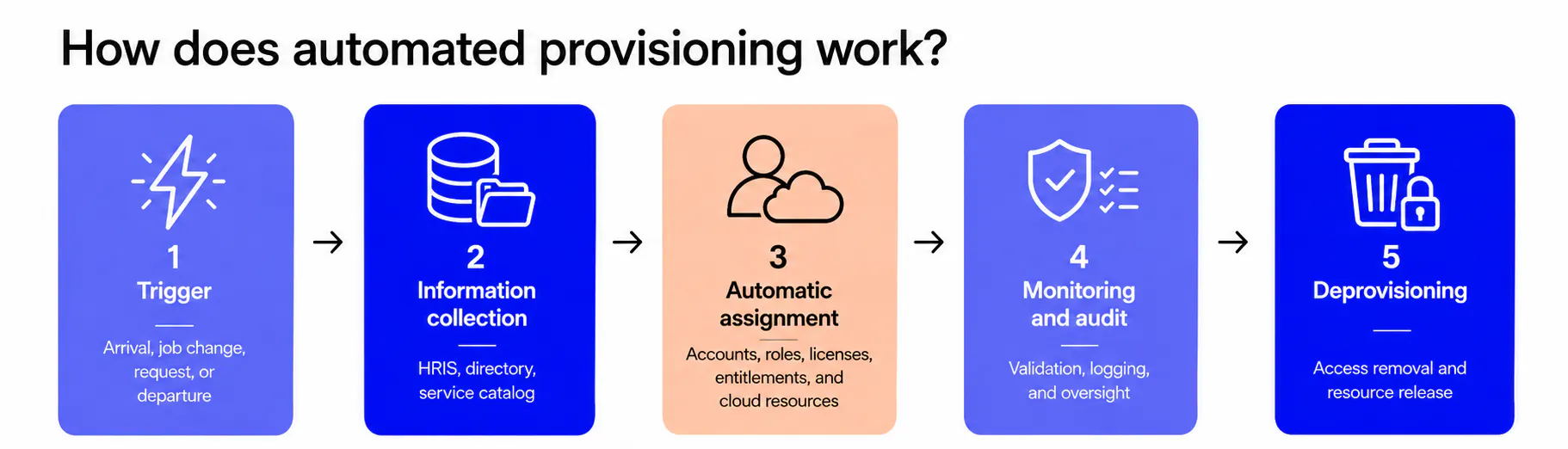
An automated process generally consists of four steps.
- Trigger the request
A new hire, an order, a role change, or the opening of a new site triggers the process. - Collect the required information
The system retrieves information from authoritative sources: directory, HR system, service catalog, or management platform. - Allocate the resources
The required accounts, permissions, licenses, equipment, or services are created and associated with the appropriate user. - Track and control the actions
Each operation is recorded to facilitate monitoring, audits, and incident resolution.
This approach reduces gaps between different systems. It also ensures that the same rules are applied to every request.
Three mechanisms provide the technical foundation for automated provisioning.
APIs enable communication between systems and allow a provisioning tool to interact with a directory, cloud platform, or HR system without human intervention.
The SCIM (System for Cross-domain Identity Management) protocol standardizes identity data exchanges between these systems.
RBAC (Role-Based Access Control) automatically determines the permissions assigned based on the user's role.
What is deprovisioning?
Deprovisioning consists of removing permissions, disabling accounts, and releasing resources that are no longer required.
It is typically performed when an employee leaves, changes roles, completes an assignment, or a service is terminated.
Fast deprovisioning limits orphaned accounts, unused licenses, and obsolete access rights. It therefore reduces costs and strengthens information system security.
How does provisioning strengthen security?
Every permission granted increases the exposure surface of an organization's information system. Automation helps enforce the principle of least privilege: each user receives only the access rights required for their activities.
Secure provisioning relies on clearly defined roles, approval of sensitive access, traceability of changes, and the rapid removal of unnecessary permissions.
It does not replace a cybersecurity policy, but it makes that policy easier to apply on a day-to-day basis.
How does Sewan simplify provisioning with Sophia?
The Sophia platform centralizes the management of Sewan's Cloud and Telecom solutions in a single, automated platform. IT teams and partners can order, deploy, modify, and monitor their services from the same environment.
From Sophia, an administrator can:
- order new services individually or in bulk
- manage users and their permissions
- assign or reassign resources
- activate and manage telephone lines
- adjust services as requirements evolve
- manage multiple customers or sites from a centralized interface
This approach reduces the number of tools and interventions required. Teams gain greater autonomy, while partners can manage their customers' services more easily.
Provisioning also applies to Cloud resources. Sewan enables, among other things, the automated deployment of virtual machines and their management through Sophia.
Q&A: IT provisioning
Provisioning refers to the allocation and provision of IT resources (servers, accounts, network access) according to an organization's needs, from the creation of permissions through to their revocation.
Provisioning determines which resources should be allocated and to whom. Configuration defines how those resources operate (network settings, security rules). The two operations follow one another, but they address different questions.
User provisioning automation relies on a trigger (new hire, role change), a predefined workflow, and data exchange protocols such as SCIM and APIs. Access rights are assigned automatically based on the user's profile, without manual intervention.
User provisioning is the management of the user account lifecycle: creation during onboarding, modification when an employee changes roles, and revocation when they leave the organization.
Cloud computing has amplified the importance of provisioning by making resources almost infinitely scalable. Instantiating a server or activating a SaaS subscription can now be done within minutes, making automation and access control even more essential.

Simplify your provisioning with Sophia
Manage your users, services, and resources from a single platform designed to accelerate deployments.

Article topicsInternet and Networks