MDM (Mobile Device Management) is a software solution that allows IT teams to remotely manage, configure, and secure all the mobile devices used within a company: smartphones, tablets, and laptops can all be administered from a single interface. In a context shaped by remote work, employee mobility, and the rise of cyber threats, MDM has become an essential lever for strengthening IT security while simplifying device management.
What is MDM (Mobile Device Management)?
Mobile Device Management refers to the set of tools and processes that allow an organisation to oversee and secure its mobile devices from a centralised administration console. Initially designed to administer the first professional mobile devices, MDM has evolved with the rise of smartphones and hybrid work. Today, it is a key component of corporate security strategy.
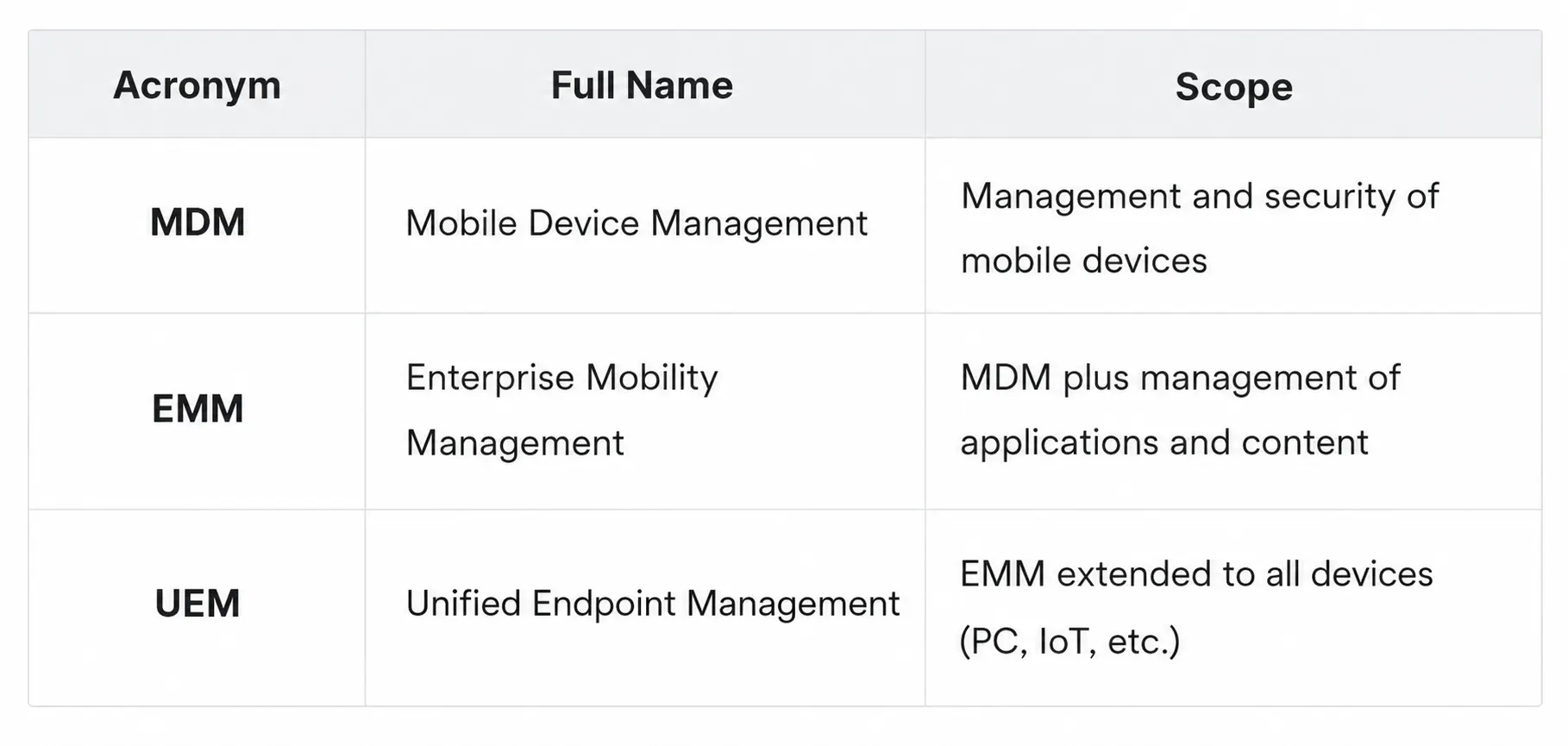
MDM, EMM, UEM: what are the differences?
MDM, EMM, UEM For most organisations, MDM is the first step towards centralised device management. EMM and UEM approaches then enrich this management with broader functionalities.
How Does an MDM Solution Work?
Device enrolment
Before it can be managed, each device must be registered in the administration console: this is the enrolment stage. For company-provided devices, automated methods such as Zero Touch Enrollment (Android) or Apple Business Manager make it possible to pre-configure devices before their first use. This automation significantly reduces device preparation time and limits configuration errors.
For personal devices in a BYOD context, enrolment is generally carried out via a QR code or an identifier provided by the IT administrator.
Managing security policies
Once enrolled, each device is subject to the policies defined by the IT team: mandatory PIN code or biometric authentication, data encryption, application restrictions, automatic configuration of the corporate VPN and Wi-Fi, and access to corporate email. These rules are applied en masse, in just a few clicks, across the entire mobile fleet, whether it consists of ten or a thousand devices.
IT teams thus maintain a consistent level of security across the entire fleet, without multiplying manual interventions.
Remote control, monitoring, and actions
The console provides a real-time inventory of all enrolled devices: model, operating system, compliance level, and location. As soon as a device shows an anomaly (outdated OS version, unauthorised application, detected jailbreak), an alert is generated.
Administrators can then act remotely in just a few clicks:
- Lock a device in the event of loss or theft.
- Selectively wipe corporate data without deleting the user's personal data.
- Quarantine a device when it no longer complies with security policies.
- Locate, block, or reset a lost or stolen device to limit the risk of data leakage.
This remote intervention capability makes it possible to respond quickly to incidents while ensuring the security of company data.
Why Has MDM Become Essential in the Enterprise?
Mobile devices are at the heart of professional usage. According to Grand View Research, smartphones accounted for more than 54% of global MDM market revenue in 2024, reflecting their central place in the corporate fleets that need securing. Yet an unmanaged device connected to the corporate network constitutes a blind spot: neither visible, nor controlled, nor compliant. This is known as shadow IT, and a single compromised device can be enough to expose the entire information system.
The explosion of remote work has amplified this risk. Employees access corporate resources from home or public networks, sometimes on personal devices. In the event of loss or theft, IT teams must be able to lock, isolate, or wipe corporate data remotely in order to limit the risk of data leakage.
The regulatory dimension makes this even more urgent. The GDPR requires companies to demonstrate that the personal data they process is protected, including on mobile devices. The NIS2 directive, which came into force in October 2024, extends this obligation to mobile endpoints in critical sectors across Europe.
In this context, companies that rely on a secure remote work and mobility policy and wish to secure their mobile usage, demonstrate their compliance, and maintain visibility over their fleet can no longer do without a centralised device management solution.
How to Implement an MDM in Your Company?
Deployment follows a logical five-step sequence.
Audit of the existing fleet
Inventory the devices in circulation: models, operating systems, usage (BYOD or company devices). This audit often reveals the true extent of shadow IT. To make your mobile fleet management reliable, it is essential to start from a complete overview.
Defining the mobile security policy
Which applications are authorised? What level of encryption is required? Are personal devices accepted? These choices determine the console's configuration and must be documented before any setup.
Choosing the solution
Cloud-based deployments dominate the market and integrate naturally with Microsoft 365 environments, of which Microsoft Intune is today one of the leading references. On-premise solutions remain relevant for organisations subject to strict sovereignty constraints.
Enrolment and deployment
Corporate devices are enrolled via manufacturer programmes (Apple Business Manager, Android Enterprise). BYOD devices follow a guided process, with the creation of an isolated professional workspace that protects the user's privacy through containerisation.
Continuous monitoring
Once deployed, the tool integrates into the cybersecurity of your devices as part of a permanent monitoring approach. Non-compliance alerts, OTA updates, and activity reports allow the IT team to maintain the security level without systematic manual intervention. Platforms such as Sophia work along these lines: they centralise the management of mobile lines and Cloud and Telecom services from a single interface, reducing blind spots and simplifying day-to-day management.
Centralise the Management of Your Mobile Fleet with Sophia
Managing mobile devices is not limited to deploying an MDM solution. IT teams must also track mobile lines, consumption, associated services, and user requests.
With Sophia, Sewan's management platform, you centralise all your Cloud, Telecom, and mobile services from a single interface. You gain a consolidated view of your fleet, simplify operational management, and reduce the administrative tasks linked to equipment management.
This approach allows IT teams to save time on a daily basis while maintaining better control over their digital environment.
To find out more about the associated technical terms, Sewan's Cloud and Telecom glossary lists the key definitions of the telecom and IT ecosystem.